I2C
The examples in this chapter use the I2C device: 1.54inch Touch LCD Module
1. I2C Subsystem
The Luckfox Lume I2C interfaces are called TWI in the SDK. This chapter uses TWI5, with the device node /dev/i2c-5.
/sys/bus/i2c/devices/: Lists I2C adapters and registered slave devices./dev/i2c-*: Provides user-space access to I2C buses.i2cdetect,i2cget: Probe device addresses and read registers.
2. I2C Testing (Shell)
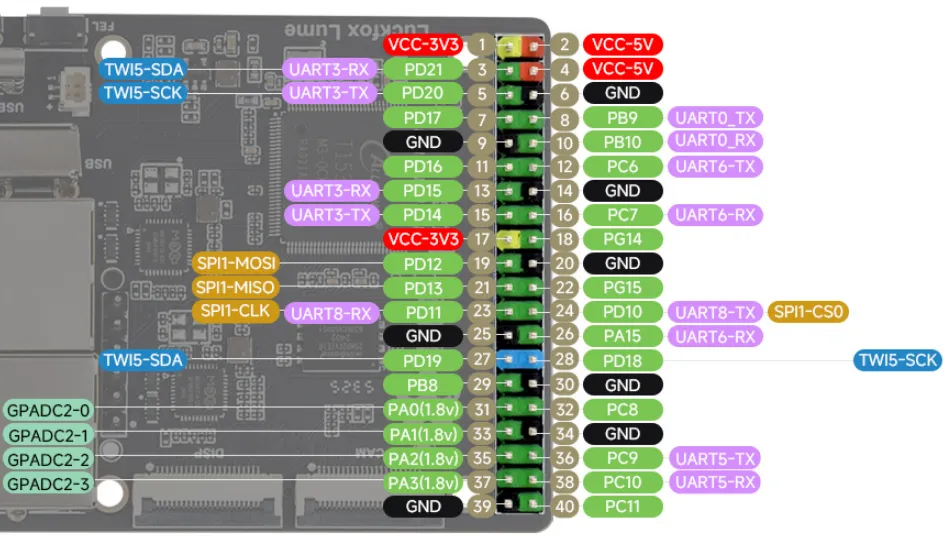
2.1 Pinout
| Physical Pin | Multiplexed Function | GPIO | Description |
|---|---|---|---|
| 3 | TWI5-SDA | PD21 | Data line |
| 5 | TWI5-SCL | PD20 | Clock line |
| 1 or 17 | 3.3V | - | Peripheral power supply |
| 6, 9, etc. | GND | - | Common ground |
2.2 Viewing Devices
On Linux, the /sys/bus/i2c/devices/ directory contains all I2C bus adapters and attached I2C slave device nodes.
- List the I2C buses registered in the system:
root@luckfox:~# ls /sys/bus/i2c/devices/5-0045 5-005d i2c-5
- View I2C device nodes and bus names:
root@luckfox:~# ls /dev/i2c-*/dev/i2c-5root@luckfox:~# i2cdetect -li2c-5 i2c SUNXI TWI(0x02515000) I2C adapter
Directories use two naming formats:
- I2C bus adapters (controllers): Named
i2c-X, whereXis the I2C bus number. For example,i2c-1is I2C bus 1. - I2C slave peripherals: Named
X-YYYY, whereXis the bus number andYYYYis the slave device's hexadecimal address.
2.3 I2C Testing
-
List devices on the i2c-5 interface:
i2cdetect -a -y 5Hexadecimal values in the scan results are slave device addresses.
--means no device was detected, andUUmeans the address is already in use by a kernel driver. -
Read all registers of the device at address 0x15:
i2cdump -f -y 5 0x15 -
Read a specific register of an I2C device, such as register
0xA7of the device at address0x15:i2cget -f -y 5 0x15 0xA7 -
Write
0x6fto register0xA7:i2cset -f -y 5 0x15 0xA7 0x6f
Before scanning or writing registers, check the device manual for the address and register definitions to avoid unintended changes to the device state.
3. I2C Communication (Python)
-
Complete code: The following example reads register
0xA7from the device at address0x15on I2C-5 (TWI5). It submits two messages in a singleI2C_RDWRoperation: first sending the register index, then reading one byte with a repeated START.#!/usr/bin/env python3import ctypesimport errnoimport fcntlimport osimport sysI2C_BUS = 5I2C_ADDR = 0x15REG_ADDR = 0xA7I2C_SLAVE = 0x0703I2C_RDWR = 0x0707I2C_M_RD = 0x0001class I2CMsg(ctypes.Structure):_fields_ = [("addr", ctypes.c_uint16),("flags", ctypes.c_uint16),("len", ctypes.c_uint16),("buf", ctypes.POINTER(ctypes.c_uint8)),]class I2CRdwrData(ctypes.Structure):_fields_ = [("msgs", ctypes.POINTER(I2CMsg)),("nmsgs", ctypes.c_uint32),]def read_register(fd, address, register):if not 0x03 <= address <= 0x77:raise ValueError("Expected a non-reserved 7-bit I2C address")if not 0 <= register <= 0xFF:raise ValueError("Expected an 8-bit register address")fcntl.ioctl(fd, I2C_SLAVE, address)tx = (ctypes.c_uint8 * 1)(register)rx = (ctypes.c_uint8 * 1)()messages = (I2CMsg * 2)(I2CMsg(address, 0, 1, tx),I2CMsg(address, I2C_M_RD, 1, rx),)transfer = I2CRdwrData(messages, 2)argument = bytearray(bytes(transfer))completed = fcntl.ioctl(fd, I2C_RDWR, argument, True)if completed != 2:raise OSError(errno.EIO,f"Incomplete I2C transfer: {completed}/2 messages")return rx[0]def main():fd = Nonetry:fd = os.open(f"/dev/i2c-{I2C_BUS}", os.O_RDWR)value = read_register(fd, I2C_ADDR, REG_ADDR)print(f"0x{I2C_ADDR:02X}[0x{REG_ADDR:02X}] = 0x{value:02X}")return 0except (OSError, ValueError) as error:print(f"I2C communication failed: {error}", file=sys.stderr)return 1finally:if fd is not None:os.close(fd)if __name__ == "__main__":sys.exit(main()) -
Open the device and select the address:
fd = os.open(f"/dev/i2c-{I2C_BUS}", os.O_RDWR)Open
/dev/i2c-5for reading and writing. Then check whether the address is available inread_register():fcntl.ioctl(fd, I2C_SLAVE, address)addressis the 7-bit address 0x15 and does not need to be shifted left. An error is returned if a driver already owns the address. -
Read the register:
messages = (I2CMsg * 2)(I2CMsg(address, 0, 1, tx),I2CMsg(address, I2C_M_RD, 1, rx),)transfer = I2CRdwrData(messages, 2)argument = bytearray(bytes(transfer))completed = fcntl.ioctl(fd, I2C_RDWR, argument, True)The first message sends the register index, and the second reads one byte, with a repeated START between them. Sending 0xA7 selects the register to read; it does not write register data.
-
Run the program:
python3 IIC.pyOutput:

4. I2C Communication (C)
-
Complete code:
#include <errno.h>#include <fcntl.h>#include <linux/i2c-dev.h>#include <linux/i2c.h>#include <stdint.h>#include <stdio.h>#include <stdlib.h>#include <string.h>#include <sys/ioctl.h>#include <unistd.h>#define I2C_DEVICE "/dev/i2c-5"#define I2C_ADDRESS 0x15#define REG_ADDRESS 0xA7int main(void){uint8_t reg = REG_ADDRESS, value = 0;struct i2c_msg messages[2] = {{ .addr = I2C_ADDRESS, .flags = 0, .len = 1, .buf = ® },{ .addr = I2C_ADDRESS, .flags = I2C_M_RD, .len = 1, .buf = &value },};struct i2c_rdwr_ioctl_data transfer = {.msgs = messages, .nmsgs = 2,};int fd = open(I2C_DEVICE, O_RDWR);if (fd < 0) {fprintf(stderr, "open %s failed: %s\n",I2C_DEVICE, strerror(errno));return EXIT_FAILURE;}if (ioctl(fd, I2C_SLAVE, I2C_ADDRESS) < 0) {fprintf(stderr, "I2C address selection failed: %s\n", strerror(errno));close(fd);return EXIT_FAILURE;}int completed = ioctl(fd, I2C_RDWR, &transfer);if (completed < 0) {fprintf(stderr, "I2C transfer failed: %s\n", strerror(errno));close(fd);return EXIT_FAILURE;}if (completed != 2) {fprintf(stderr, "Incomplete I2C transfer: %d/2 messages\n", completed);close(fd);return EXIT_FAILURE;}printf("0x%02X[0x%02X] = 0x%02X\n",I2C_ADDRESS, REG_ADDRESS, value);close(fd);return EXIT_SUCCESS;} -
Read the register:
struct i2c_msg messages[2] = {{ .addr = I2C_ADDRESS, .flags = 0, .len = 1, .buf = ® },{ .addr = I2C_ADDRESS, .flags = I2C_M_RD, .len = 1, .buf = &value },};struct i2c_rdwr_ioctl_data transfer = {.msgs = messages, .nmsgs = 2,};The first message sends 0xA7, and the second receives one byte. Call
ioctl(fd, I2C_RDWR, &transfer)to submit the combined transaction. If it returns 2, retrieve the result fromvalue. Callclose(fd)before exiting to release the device. -
Cross-compile:
export PATH=<Luckfox_Lume_SDK>/out/toolchain/gcc-linaro-11.3.1-2022.06-x86_64_arm-linux-gnueabihf/bin:$PATHarm-linux-gnueabihf-gcc -Wall -Wextra -O2 IIC.c -o IIC -
Transfer and run:
scp IIC root@<LUME_IP>:/root/Run on the board:
chmod +x /root/IIC/root/IICOutput:
